Attorney Portal Dashboard
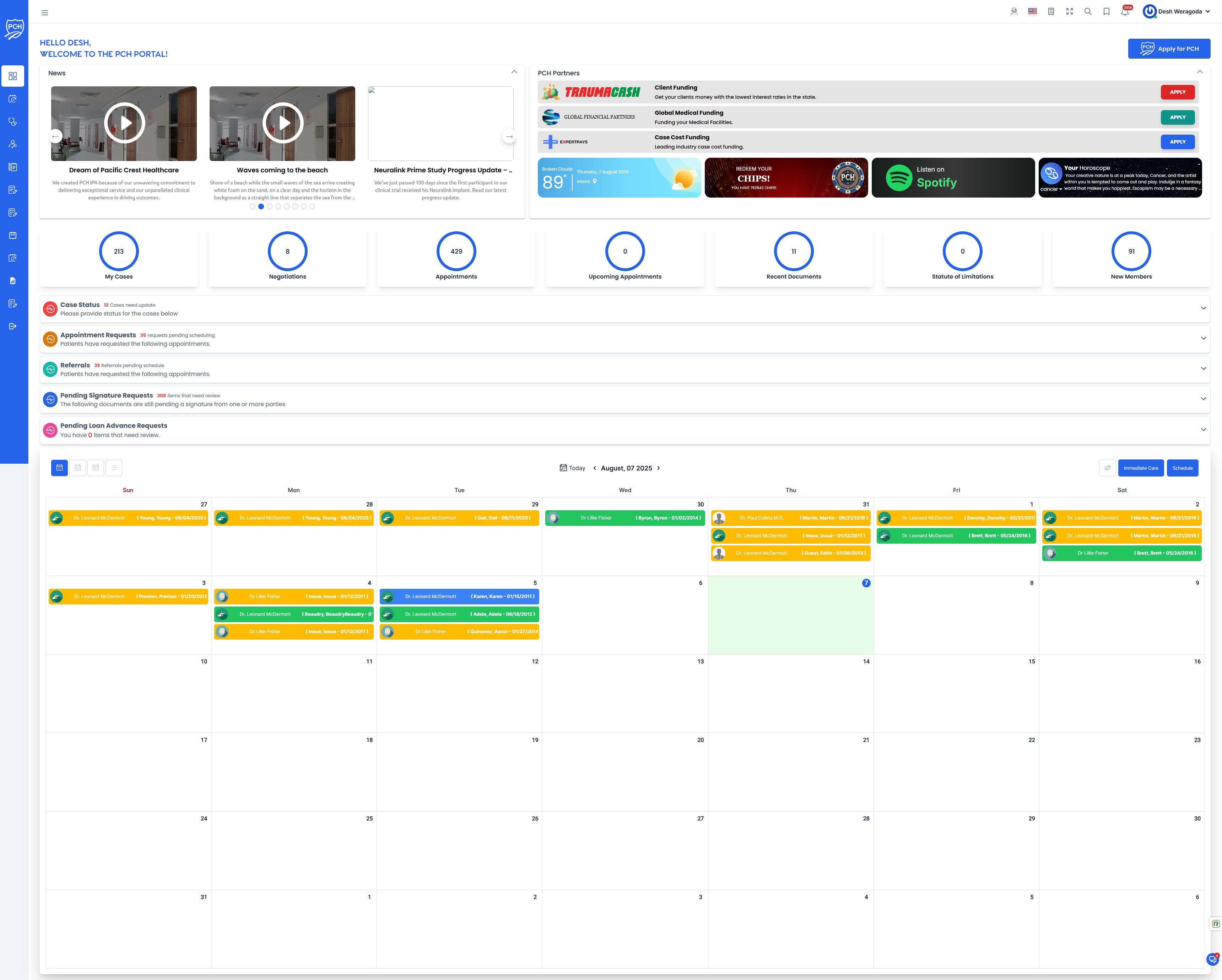
The Attorney Portal Dashboard provides a comprehensive interface for managing legal cases within the Pacific Crest Healthcare (PCH) ecosystem. This MedLegal platform serves as a central hub for attorneys and case managers to track patients and their personal injury legal cases, manage healthcare provider liens, and monitor medical expenses against available insurance policies. This platform is built on the Case Clinical platform. All medical related information will be stored in the Case Clinical platform and be provided to the Attorney via our integrations with Litify, CasePeer, Filevine, Clio and other third party applications. If the Attorney does not have a Case Management system, they can still use this portal to provide details to PCH and track the status of their cases. All medical records, scheduling, and billing will be handled by Case Clinical.
Platform Purpose
The Attorney Portal is designed to:
- Facilitate patient enrollment in the Pacific Crest Healthcare Independent Provider Association (IPA)
- Manage consolidated liens for all in-network medical services (visits, treatments, procedures)
- Track out-of-network liens to ensure medical expenses don't exceed available insurance coverage
- Provide comprehensive case management tools for attorneys and case managers
- Streamline the medical-legal workflow for personal injury cases
Primary Feature
Apply for PCH
The Apply for PCH feature is the cornerstone of the Attorney Portal. This functionality allows attorneys to:
- Enroll patients in the Pacific Crest Healthcare Independent Provider Association
- Establish a single consolidated lien for all in-network medical services
- Streamline medical billing and payment processes
- Ensure coordinated care within the PCH network
- Maximize available insurance benefits for patient treatment
Additional Dashboard Features
The dashboard is designed to provide quick access to:
- Case Summary Statistics: View total active cases, recently updated cases, and cases requiring attention
- Upcoming Deadlines: Track important dates and deadlines for all active cases
- Recent Activity: Monitor recent changes and updates across your caseload
- Quick Actions: Access frequently used tools and functions with a single click
- Notifications: Stay informed about important updates and system alerts
Dashboard Components
Case Management
- Apply for PCH - Process Pacific Crest Healthcare IPA membership applications
- Case Status Requests - View and manage case status update requests
- Pending Loan Advance Requests - Review and process pending loan advance requests
- Pending Patient Signature Requests - Track documents awaiting patient signatures
- Referrals - Manage incoming and outgoing Patient Requests to see Providers or Provider Referrals.
Calendar & Appointments
- Calendar - View your daily, weekly, and monthly schedule
- Appointment Requests - Manage incoming appointment requests
- Gauges - Appointments - Track appointment metrics
- Gauges - Upcoming Appointments - View upcoming scheduled appointments
Case Analytics
- Gauges - My Cases - Overview of your active caseload
- Gauges - Negotiations - Track case negotiation status and progress
- Gauges - Recent Documents - Access recently updated case documents
- Gauges - Statute of Limitations - Monitor approaching statute deadlines
Partner Network
- Expert Pays - Manage expert witness payments
- Global Financial Partners - Access financial partner information
- Trauma Cash - Apply for Trauma Cash, Presettlement Cash Advance to the Patient.
- Chart Squad - Medical Records Requests
Casino Rewards Program
- Casino - Points Total - View accumulated reward points
- Casino - History of Points - Track point history and transactions
- Casino - Spin Day Button - Access daily reward spin feature
- Casino - Non-Points Day Button - Alternative reward options
- Casino - Cart - Add Gift Card - Add gift cards to rewards cart
- Casino - Cart - Checkout - Complete rewards redemption
Information & Updates
- News Feed - Latest industry and company news
- News - General news updates
- Welcome Message - Personalized dashboard greeting
- Weather - Local weather information
- Horoscope - Daily horoscope feature
- Spotify - Music integration
Navigation
From the dashboard, users can:
- Navigate to individual case details by selecting a case from the list
- Access administrative functions through the sidebar menu
- View and manage their personal profile and settings
- Generate reports and analytics based on case data
Customization
The dashboard can be customized to display the most relevant information for each user's role and responsibilities. Users can:
- Filter the case list by various criteria
- Sort cases by priority, status, or other attributes
- Configure which widgets and metrics appear on their dashboard
- Set notification preferences for different types of updates