Servicing / Collections Dashboard
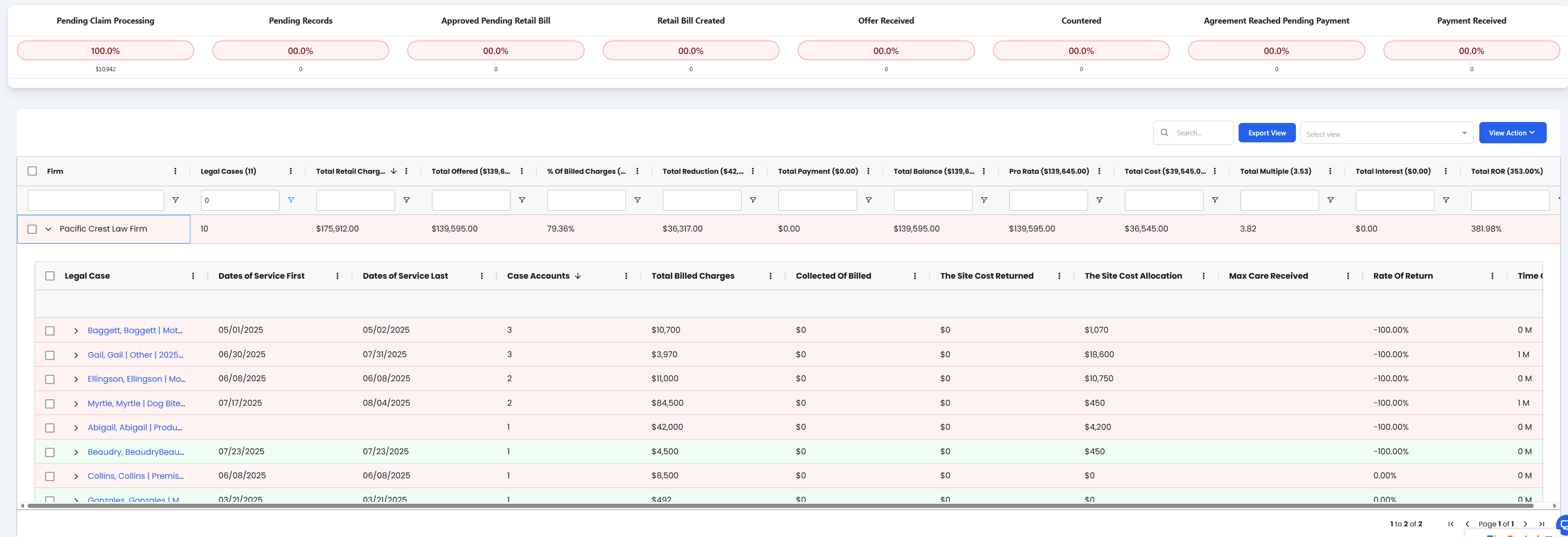
The Servicing / Collections Dashboard displays firms with outstanding retail bills, organized in a hierarchical grid that allows drill-down from firm summary to individual legal cases, invoices, and offers.
Key Features
Firm-Based Collections Grid
- Hierarchical Organization: Firms with outstanding retail bills displayed at top level
- Expandable Rows: Click chevron to drill down into firm details
- Multi-Level Navigation: Firm → Legal Cases → Invoice Details → Offers
- Outstanding Balance Tracking: Real-time view of all receivables by firm
Drill-Down Navigation
- Firm Summary: Top-level view of all firms with outstanding balances
- Legal Case Summary: Individual cases within each firm (expand with chevron)
- Invoice Details: Specific invoices and billing information per case
- Offers: Settlement offers and payment arrangements
Collections Management
- Outstanding Retail Bills: Track unpaid bills across all organizations
- Payment Tracking: Monitor payment status and collection efforts
- Settlement Management: Handle offers and payment negotiations
- Firm-Level Analytics: Aggregate data by law firm for strategic collections
Collections Grid Structure
The collections dashboard uses a 4-level hierarchical structure with expandable rows:
1. Firm Summary Table

| Column Header | Description | Formula | Example |
|---|---|---|---|
| Firm Name | Legal firm name with outstanding balances | Direct from firm record | "Smith & Associates Law" |
| Total Outstanding | Sum of all unpaid retail bills for the firm | SUM(all_unpaid_invoices) | $45,250.00 |
| Number of Cases | Count of legal cases with outstanding balances | COUNT(cases_with_balances) | 12 |
| Oldest Invoice Date | Date of the oldest unpaid invoice | MIN(invoice_date) | 2024-03-15 |
| Last Payment Date | Most recent payment received from firm | MAX(payment_date) | 2024-08-20 |
| Collection Status | Current collection phase | Based on aging rules | "Second Notice" |
| Chevron | Expand/collapse control | Interactive UI element | ▼ (expanded) / ▶ (collapsed) |
2. Legal Case Summary Table (Drill-down from Firm)

| Column Header | Description | Formula | Example |
|---|---|---|---|
| Case Number | Unique identifier for the legal case (clickable) | System-generated ID | "CC-2024-001234" |
| Patient Name | Name of the patient in the case | From case record | "John Doe" |
| Case Outstanding | Total unpaid amount for this specific case | SUM(case_invoices) | $3,750.00 |
| Number of Invoices | Count of invoices for this case | COUNT(invoices) | 3 |
| Case Status | Current status of the legal case | From case management | "Active" |
| Last Activity Date | Most recent activity on the case | MAX(activity_date) | 2024-09-01 |
| Chevron | Expand/collapse control for invoice details | Interactive UI element | ▼ / ▶ |
Negotiations Drill-Through
Clicking on the Case Number navigates to the detailed Negotiations Dashboard for that specific legal case.

3. Invoice Details Table (Drill-down from Legal Case)

| Column Header | Description | Formula | Example |
|---|---|---|---|
| Invoice Number | Unique invoice identifier | System-generated | "INV-2024-005678" |
| Invoice Date | Date invoice was generated | From invoice record | 2024-07-15 |
| Service Description | Description of services provided | From service record | "MRI Lumbar Spine" |
| Invoice Amount | Original invoice amount | From invoice | $1,250.00 |
| Amount Paid | Total payments received | SUM(payments) | $0.00 |
| Balance Due | Remaining unpaid balance | Invoice_Amount - Amount_Paid | $1,250.00 |
| Days Outstanding | Days since invoice date | TODAY() - Invoice_Date | 48 |
| Chevron | Expand/collapse control for offers | Interactive UI element | ▼ / ▶ |
4. Offers Table (Drill-down from Invoice Details)

| Column Header | Description | Formula | Example |
|---|---|---|---|
| Offer Date | Date the settlement offer was made | From offer record | 2024-08-30 |
| Offer Type | Type of settlement offer | From offer category | "Lump Sum Settlement" |
| Offer Amount | Proposed settlement amount | From offer record | $875.00 |
| Discount Percentage | Percentage discount from original | (1 - Offer_Amount/Invoice_Amount) * 100 | 30% |
| Offer Status | Current status of the offer | From workflow status | "Pending Response" |
| Expiration Date | When the offer expires | Offer_Date + validity_period | 2024-09-15 |
| Response Date | Date firm responded to offer | From response record | 2024-09-02 |
| Notes | Additional offer details | Free text field | "Hardship consideration" |
Navigation Flow
Hierarchical Drill-Down
- Start: Firm Summary view shows all firms with outstanding balances
- Level 1: Click chevron (▼) next to firm name to expand legal cases
- Level 2: Click chevron next to case to expand invoice details
- Level 3: Click chevron next to invoice to expand settlement offers
- Level 4: View all offers and negotiations for specific invoice
Alternative Navigation
- Case Number Click: Click on any Case Number to drill-through to detailed negotiations screen
- Direct Access: Bypass hierarchical expansion to access full case negotiations details
Interactive Elements
- Chevron Controls: ▶ (collapsed) / ▼ (expanded) for each expandable row
- Sortable Columns: Click column headers to sort data
- Filter Options: Filter by collection status, date ranges, amounts
- Export Functions: Export data at any drill-down level
Quick Actions
- Expand/collapse all firm rows
- Generate collection letters by firm
- Create settlement offers
- Process payments and adjustments
- Export collections data
- Update collection status
Permissions & Access
Collections Manager: Full access to all firms and collection actions Collections Specialists: Access to assigned firms and cases Finance Team: Read-only access to outstanding balances and reports Legal Team: Access to case-specific collection information Customer Service: Limited access for payment processing and inquiries