Accounting Dashboard
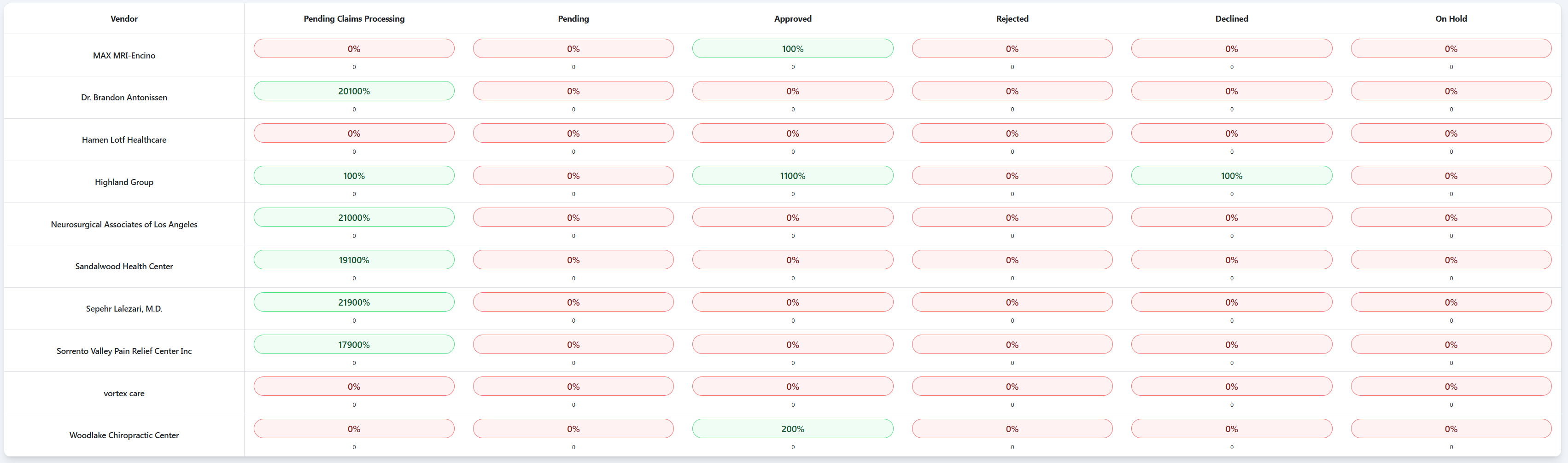
The Accounting Dashboard provides vendor budgeting and case account management, tracking financial phases from claims processing through final approval or resolution.
Key Features
Vendor Budgeting Summary
- Vendor-Based Organization: Financial tracking organized by medical provider/vendor
- Phase-Based Counts: Display count of case accounts in each processing phase
- Site Cost Tracking: Total dollar amounts to be paid to providers for each phase
- Budget Overview: Comprehensive view of financial commitments by vendor
Case Account Management
- Individual Code Tracking: Each medical code gets its own case account
- Phase Progression: Track accounts through 6 distinct phases
- Status Monitoring: Real-time visibility into account processing status
- Financial Commitment: Track site costs and payment obligations
TPA Integration
- Claims Processing: Direct connection with Third Party Administrator (TPA)
- Medicare Rate Verification: Ensure medicare rates are on file for each code
- Automated Rate Lookup: System verification of approved payment rates
- Compliance Tracking: Maintain regulatory compliance for billing codes
Workflow Management
- Phase Transitions: Automated and manual movement between phases
- Approval Workflows: Structured approval process for case accounts
- Dispute Resolution: Handle provider disputes and code challenges
- Hold Management: Manage cases placed on hold during funding decisions
Case Account Processing Phases
The dashboard displays 6 phases from left to right, each showing:
- Count: Number of case accounts in that phase
- Site Cost: Total dollar amount to be paid to providers
1. Claims Processing
- Purpose: Initial phase connecting with TPA
- Process: Verify medicare rates are on file for each medical code
- TPA Integration: Automated rate verification and compliance checking
- Output: Case accounts ready for creation
2. Pending
- Purpose: Case accounts created and awaiting processing
- Process: Individual case account created for each medical code
- Status: Waiting for bill of sale creation and signing
- Tracking: Monitor accounts ready for approval workflow
3. Approved
- Purpose: Case accounts with completed bill of sale
- Process: Bill of sale created and signed by all parties
- Status: Ready for provider payment processing
- Financial Commitment: Confirmed site costs for provider payment
4. Declined
- Purpose: Provider-disputed codes and services
- Process: Handle provider disputes over specific codes
- Resolution: Work with providers to resolve code disagreements
- Status: Requires manual review and potential re-negotiation
5. Rejected
- Purpose: Claims with TPA or Underwriting issues
- Process: Address problems identified by TPA or Underwriting team
- Issues: Rate problems, compliance issues, or coverage concerns
- Resolution: Requires correction before proceeding
6. On Hold
- Purpose: Cases where attorney funding decisions are pending
- Process: Attorney has not committed to moving forward with funding
- Status: Awaiting attorney decision on case progression
- Management: Monitor for funding decisions or case closure
Dashboard Widgets
Phase Summary Buttons
Each phase button displays:
- Phase Name: Claims Processing, Pending, Approved, etc.
- Account Count: Number of case accounts in this phase
- Site Cost Total: Dollar amount committed to providers
Drill-Down Navigation
Clicking any phase button navigates to the filtered claims/case account queue:
- URL Structure:
/queues/claims?filter__vendor=[VendorName]&filter__status=[PhaseStatus] - Example:
https://admin-uat.caseclinical.com/queues/claims?filter__vendor=Highland%20Group&filter__status=PendingClaimsProcessing - Filtered View: Shows only claims/case accounts matching the selected vendor and phase
- Dynamic Filtering: Route parameters automatically applied based on button selection
Vendor Summary
- Vendor List: All medical providers/vendors with active case accounts
- Budget by Vendor: Total financial commitment per provider
- Phase Distribution: How vendor accounts are distributed across phases
- Cost Analysis: Site cost breakdown by vendor and phase
Quick Actions
- Move case accounts between phases
- Review and resolve disputed codes
- Generate vendor budget reports
- Export phase summary data
- Update TPA rate information
- Manage bill of sale documents
Permissions & Access
Accounting Manager: Full access to all phases and vendor budgets Financial Analysts: Read-only access to phase data and cost tracking TPA Coordinators: Access to Claims Processing and rate verification Underwriting Team: Access to review Rejected phase accounts Attorney Relations: Access to On Hold phase management