Negotiations Dashboard
The Negotiations Dashboard provides detailed case-specific negotiation management, settlement tracking, and communication tools for individual legal cases.

Overview
This dashboard is accessed by clicking on a Case Number from the Collections Dashboard and provides comprehensive negotiation management for specific legal cases, including:
- Settlement offer management
- Communication tracking
- Payment arrangement negotiations
- Case-specific collection activities
Key Features
Firm Contact Card
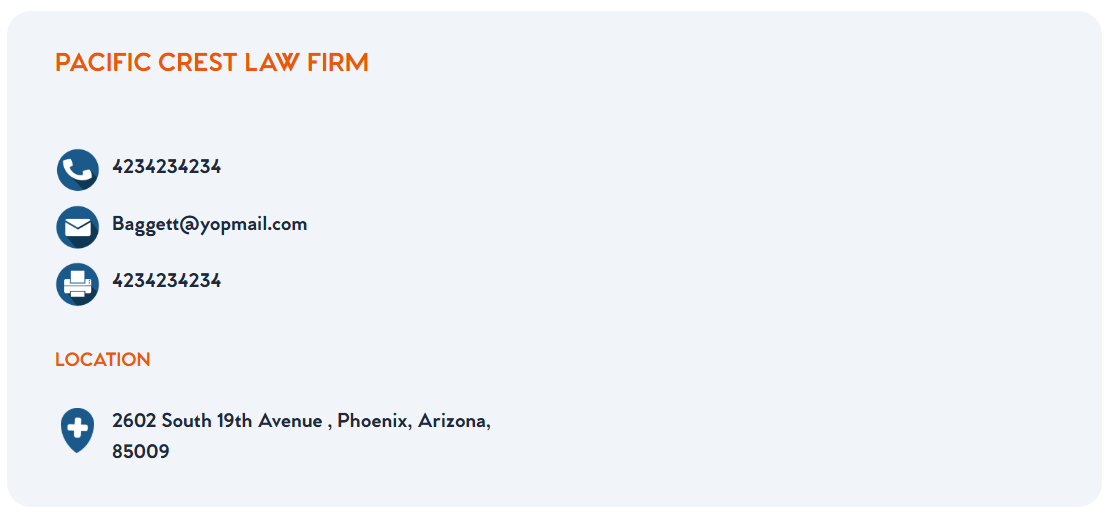
The firm contact card provides integrated communication tools with Ring Central and email provider integration:
Communication Buttons
- 📞 Phone Button: Click to dial firm phone number via Ring Central integration
- 📧 Email Button: Click to open email to firm contact via user's email provider
- 📠 Fax Button: Click to send fax to firm fax number via Ring Central
Contact Information Display
- Firm Name: Law firm name (e.g., "PACIFIC CREST LAW FIRM")
- Phone Number: Direct dial number with click-to-call functionality
- Email Address: Firm email with click-to-email functionality
- Fax Number: Fax number with click-to-fax functionality
- Physical Address: Complete firm location and mailing address
Patient Details Card
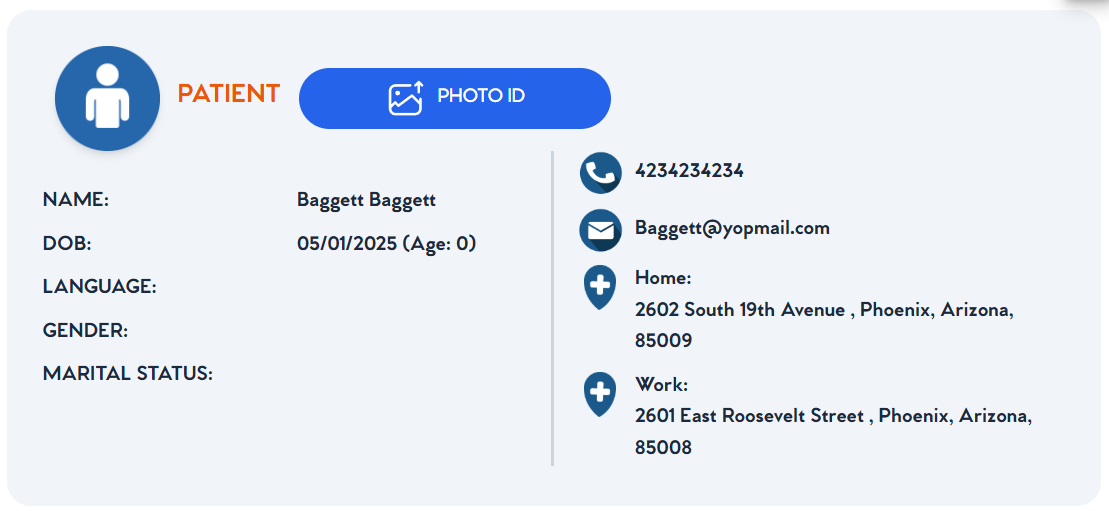
The patient details card displays comprehensive patient information with integrated communication capabilities:
Patient Information
- Name: Patient full name (e.g., "Baggett Baggett")
- DOB: Date of birth with calculated age (e.g., "05/01/2025 (Age: 0)")
- Language: Patient's preferred language
- Gender: Patient gender
- Marital Status: Current marital status
Patient Communication (Ring Central Integration)
- 📞 Phone Button: Click to dial patient phone number via Ring Central
- 📧 Email Button: Click to email patient via user's email provider
- 🏠 Home Address: Patient home address with location icon
- 🏢 Work Address: Patient work address with location icon
Additional Features
- 📷 Photo ID Button: Access patient photo identification
- Patient Icon: Visual patient identifier in the interface
Firm Financial Summary

The firm financial summary provides comprehensive financial metrics for the law firm's relationship with Case Clinical:
Financial Metrics
- Total Dates: Total dates of service that patients retained by this law firm have booked with Case Clinical providers
- Total Accounts: Total number of case accounts/codes billed for those dates of service
- Total Billed: Retail bill total created for these accounts (derived from fee schedule table lookup)
- Total Collected: Total payments that have been received from this firm
- Total Allocated: Site cost paid to providers up front + interest owed (borrowed from warehouse line to pay providers)
- Total Returned: Payment minus Allocated amount (in dollars)
- Average ROR: Return on investment ratio (Return ÷ Allocated)
- Average Time Out: Grouping by maximum care received by patient:
- Chiro | PT only
- Pain Management
- Surgical | TBI
Calculation Details
- Total Billed Formula: Code lookup against fee schedule × quantity
- Total Returned Formula: Total Collected - Total Allocated
- Average ROR Formula: Total Returned ÷ Total Allocated
- Interest Calculation: Warehouse line borrowing cost for provider advance payments
Case Search and Filtering

The case search functionality allows filtering of firm case details:
Search Features
- Search Bar: Filter cases by case number, patient name, or other case details
- Real-time Filtering: Results update dynamically as you type
- Case Navigation: Quickly locate specific cases within the firm
Firm Case Details Table
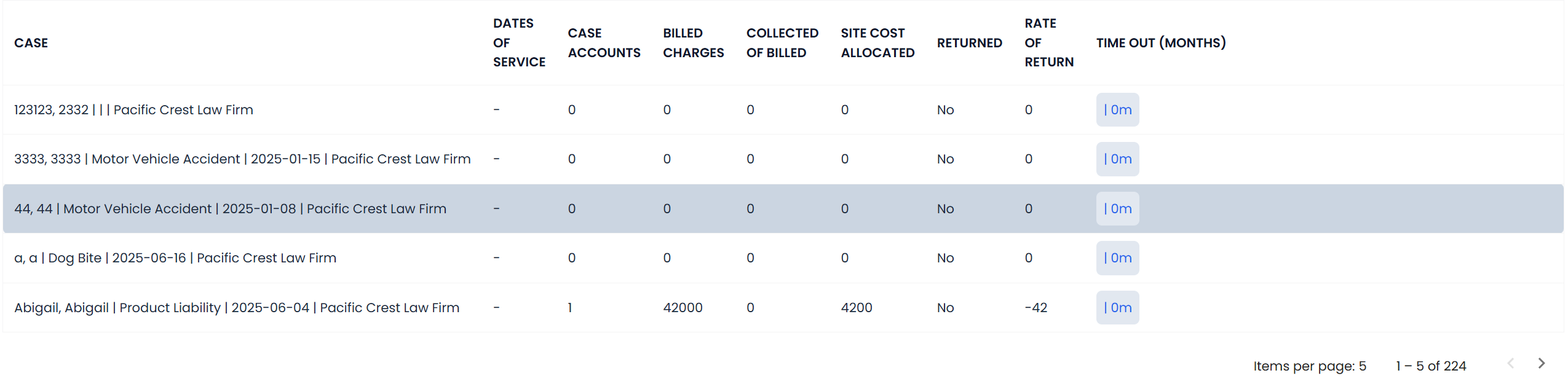
The firm case details table displays all cases for the selected firm with comprehensive financial information:
Table Columns
- Case: Case number and description with patient/incident details
- Dates of Service: Number of service dates for the case
- Case Accounts: Number of individual accounts/codes billed
- Billed Charges: Total charges billed for the case
- Collected: Amount collected from the firm for this case
- Site Cost Allocated: Cost allocated to providers for this case
- Returned: Net return amount (Collected - Allocated)
- Rate of Return: Return percentage for the case
- Time Out (Months): Duration of case in months
Interactive Features
- Searchable: Filter cases using the search bar above
- Sortable Columns: Click column headers to sort data
- Pagination: Navigate through multiple pages of cases (Items per page: 5, showing 1-5 of 224)
- Case Links: Click case numbers to access detailed case information
Outside Medical Bills (Pro Rata Analysis)

When a firm's negotiator offers less than 80% of billed/retail charges, the Outside Meds section is used to ensure fair "Pro Rata" settlement distribution:
Trigger Condition
- 80% Threshold: Activated when settlement offer is below 80% of retail charges
- Pro Rata Verification: Ensures Case Clinical receives proportional settlement to other providers
Outside Bills Summary
- Outside Bills Count: Number of medical bills outside Case Clinical's network
- Total Billed: Combined total of all outside medical bills
- Medicare Paid: Amount paid by Medicare for outside services
- Medical Paid: Amount paid by other medical insurance
- Promise to Pay: Amount firm committed to pay for outside bills
- Pro Rate: Percentage rate offered to outside providers
Outside Bills Detail Table
- Provider Name: Name of outside medical provider
- Bill Amount: Total charges from outside provider
- Promise to Pay: Amount firm agreed to pay this provider
- Who Paid: Original payer (Medicare, Medi-Cal, Commercial Insurance, Presettlement Cash Advance)
- How Much: Amount paid by original payer
- Upload Copy: Upload requirement for outside bill documentation
Pro Rata Calculation
- Comparison Logic: If outside providers received 65% settlement, Case Clinical should receive at least 65%
- Fair Distribution: Ensures proportional treatment across all medical providers
- Documentation Required: Outside bills must be provided for verification
- Settlement Justification: Validates settlement offers against industry standards
Bills Details Grid
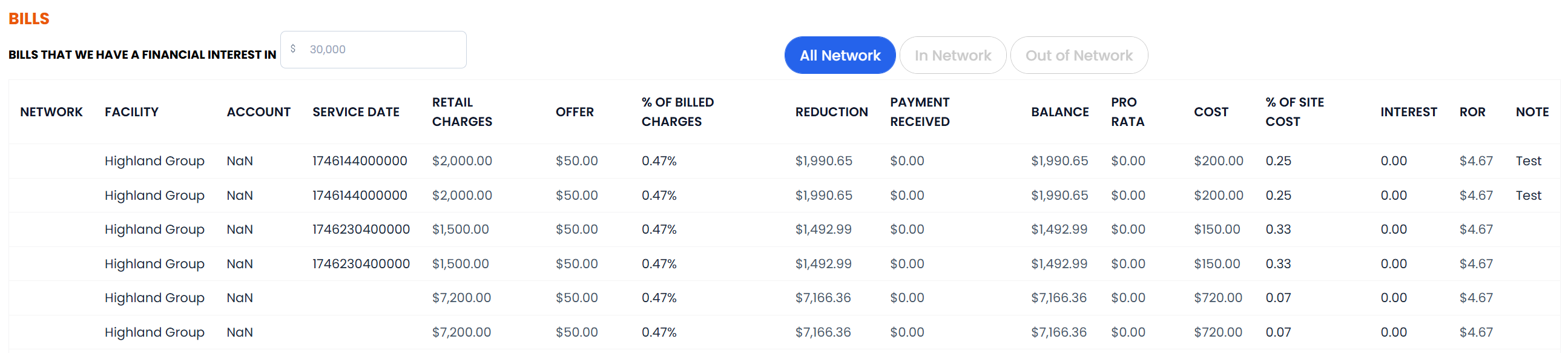
The bills details grid displays all Case Clinical bills for the case with comprehensive financial analysis:
Table Columns
- Network: Provider network status (In Network, Out of Network)
- Facility: Vendor/provider name (e.g., "Highland Group")
- Account: CPT code and service description
- Service Date: Date of service (YYYY-MM-DD format)
- Retail Charges: Original billed amount in dollars
- Offer: Amount negotiator has offered for this account
- % of Billed Charges: Offer ÷ Retail Charges (as percentage)
- Reduction: Retail Charges - Offer (in dollars)
- Payment Received: Amount attorney has actually paid
- Balance: Retail - Reduction - Payment Received (in dollars)
- Pro Rata: Calculated fair offer based on outside provider settlements
- Cost: Amount paid to provider + accrued interest
- % of Site Cost: Offer ÷ Site Cost (as percentage)
- Interest: Total interest accrued on site cost
- ROR: Rate of Return as percentage
- Notes: Bill-level negotiation notes with negotiator
Calculation Formulas
- % of Billed Charges:
(Offer ÷ Retail Charges) × 100 - Reduction:
Retail Charges - Offer - Balance:
Retail Charges - Reduction - Payment Received - Pro Rata:
Outside Med % × (This Bill Weight ÷ Total Retail) × Total Retail × Pro Rata % - % of Site Cost:
(Offer ÷ Site Cost) × 100 - ROR:
((Offer - Site Cost) ÷ Site Cost) × 100
Filtering Options
- All Network: View all bills regardless of network status
- In Network: Filter to show only in-network providers
- Out of Network: Filter to show only out-of-network providers
Financial Information Management
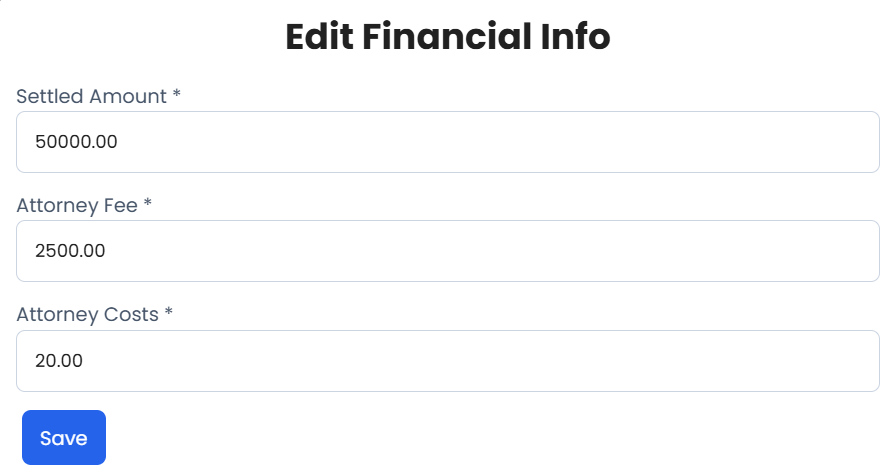
Negotiators provide key settlement financial data that updates the case summary and charts:
Edit Financial Info Form
- Settled Amount: Total settlement amount agreed upon (e.g., $50,000.00)
- Attorney Fee: Legal fees charged by the attorney (e.g., $2,500.00)
- Attorney Costs: Case costs incurred by the attorney (e.g., $20.00)
Financial Summary Dashboard
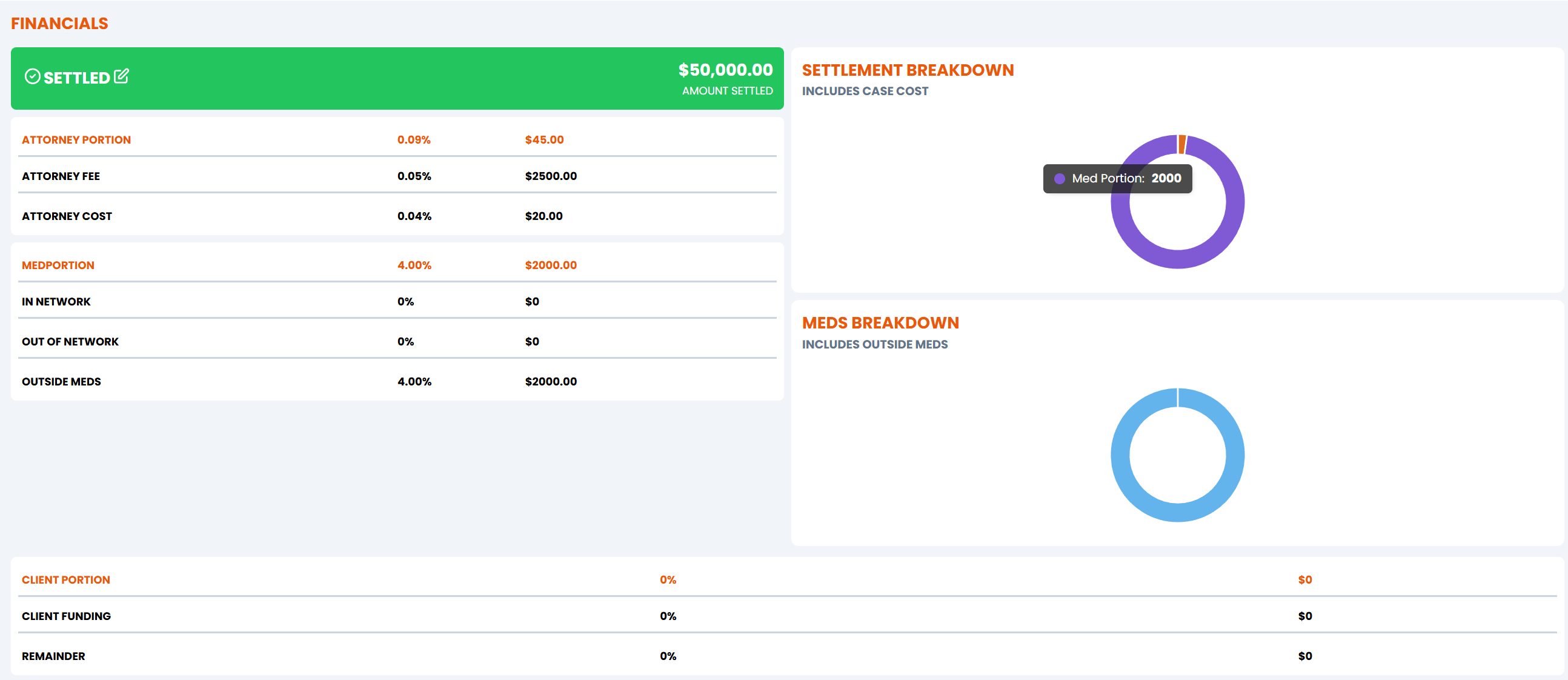
The financial summary provides comprehensive breakdown of settlement distribution:
Settlement Overview
- Settled Amount: $50,000.00 (Amount Settled - displayed in green banner)
- Settlement Breakdown: Includes case cost analysis
Attorney Portion Breakdown
- Attorney Portion: 0.09% ($45.00)
- Attorney Fee: 0.05% ($2500.00)
- Attorney Cost: 0.04% ($20.00)
Medical Portion Analysis
- Mediation: 4.00% ($2000.00)
- In Network: 0% ($0)
- Out of Network: 0% ($0)
- Outside Meds: 4.00% ($2000.00)
Client Portion Summary
- Client Portion: 0% ($0)
- Client Funding: 0% ($0)
- Remainder: 0% ($0)
Visual Charts
- Settlement Breakdown: Donut chart showing Med Portion distribution
- Meds Breakdown: Pie chart including outside meds analysis
Case Information Summary
- Case Details: Complete case information and current status
- Outstanding Balance: Total amount due for the case
- Payment History: Record of all payments and adjustments
- Integrated Communications: Ring Central and email provider connectivity
Settlement Management
- Active Offers: Current settlement offers and their status
- Offer History: Complete history of all settlement negotiations
- Approval Workflows: Settlement approval and authorization processes
- Expiration Tracking: Monitor offer expiration dates and responses
Communication Tools
- Email Integration: Send and track settlement communications
- Call Logging: Record phone conversations and follow-ups
- Document Management: Store and manage negotiation documents
- Activity Timeline: Chronological view of all case activities
Payment Processing
- Payment Plans: Create and manage structured payment arrangements
- Partial Payments: Process and track partial settlement payments
- Payment Scheduling: Set up automated payment reminders
- Adjustment Processing: Handle payment adjustments and corrections
Navigation
Access Methods
- From Collections Dashboard: Click any Case Number in the Legal Case Summary table
- Direct URL: Navigate directly using case-specific URL parameters
- Search Function: Search for specific cases using case numbers or patient names
Return Navigation
- Back to Collections: Return to the hierarchical collections grid
- Case List: View all cases for the same firm
- Dashboard Home: Return to main admin dashboard
Workflow Integration
Collections Process
- Integrates with the main collections workflow
- Updates case status in real-time
- Synchronizes with firm-level collection activities
- Maintains audit trail of all negotiation activities
Reporting
- Case-specific negotiation reports
- Settlement success tracking
- Communication activity summaries
- Payment arrangement compliance monitoring
Quick Actions
- Create new settlement offers
- Send payment reminders
- Schedule follow-up activities
- Process payments and adjustments
- Generate case reports
- Update case status
Permissions & Access
Negotiations Manager: Full access to all negotiation functions Collections Specialists: Case-specific negotiation access Settlement Coordinators: Settlement offer creation and management Customer Service: Limited access for payment processing and inquiries Legal Team: Read-only access to negotiation history and documentation
This page will be expanded with detailed functionality documentation as we continue to document the negotiations features.